


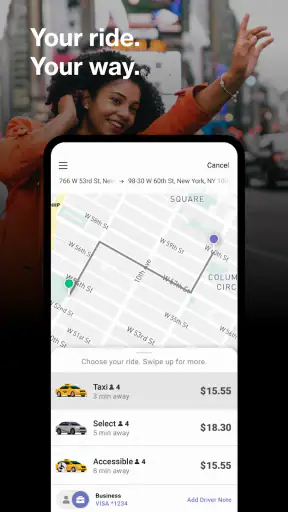
I approached Curb - Request & Pay for Taxis as a practical taxi companion rather than as a general-purpose travel planner. Its main promise is straightforward: use a phone to request a taxi, arrange a ride ahead of time, and handle payment through the app. That sounds simple, but taxi apps are judged less by their feature list than by what happens when you are standing outside a station, carrying luggage, or trying to leave an unfamiliar area in a hurry.
My overall impression is mixed in a useful way. Curb can make a taxi trip more organized, especially when I want to avoid waving down a car or dealing with payment at the end. At the same time, it is not a universal replacement for every transport app. Its usefulness depends heavily on whether taxi service connected to Curb is available where I am and whether the app, my phone, and the local pickup situation are all cooperating.
What using Curb feels like in real life
The app comes from Curb Mobility, LLC and sits in the maps and navigation category. It is free to install, aimed at Everyone, and has been available since Mar 13, 2010. The current version is 7.1.3, with a minimum operating system requirement of 9. Those details matter because this is the kind of app people often install only when they suddenly need a ride; checking device compatibility before an urgent trip is much less stressful than discovering a problem outside a venue.
Curb has reached over 1 million installs, while its average rating is 3.0 from around 8,000 ratings and roughly 4,000 written reviews. I read that combination as a warning to keep expectations realistic, not as a reason to dismiss the app. A taxi platform can work very well in one city and feel frustrating in another, because the actual experience depends on local vehicle availability, pickup rules, traffic, and how clearly the driver can reach the requested location.
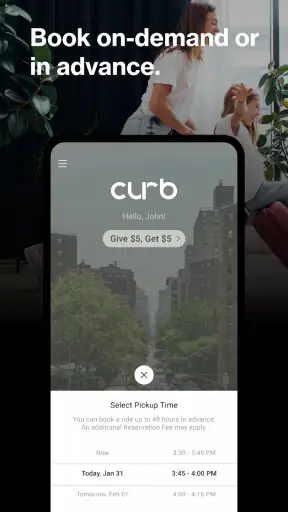
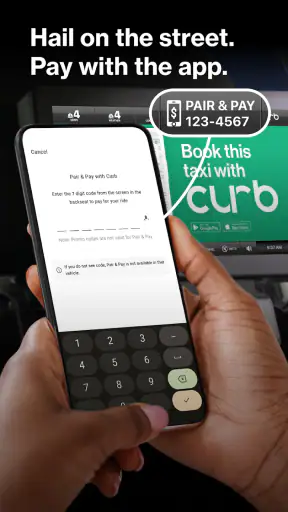
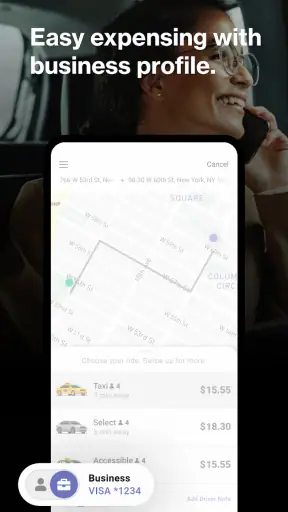
The strongest part of the concept is the connection between requesting a taxi and paying from the same phone. For a normal ride, that can remove several small points of friction. I do not have to search for cash, estimate whether a card will be accepted, or turn the final payment into a separate task while other passengers are waiting. Booking ahead can also be useful when I have a fixed departure time, although I would still leave a sensible buffer rather than treating a scheduled request as a guarantee against traffic or delays.
Where people usually get stuck
The first problem is often not the ride itself but the pickup location. A phone can place me near a large building, yet a taxi may be unable to stop at the exact pin. Airports, hotels, stadiums, hospitals, shopping centers, and busy train stations frequently have specific loading areas. If I select the most obvious map point without checking the surrounding road, the driver may arrive nearby but still be unable to find me.
I get better results when I think like a driver. I choose a pickup point that is reachable from the street, then position myself where the vehicle can actually stop. If the location has several entrances, I use the one that matches the road rather than the doorway that is closest to me on foot. This is one of the most important practical habits with Curb: a correct address is not always a usable curbside meeting point.
Another common source of confusion is timing. Requesting a taxi while still inside a large building can make the ride appear late when the real issue is that I have not reached the pickup area. Conversely, requesting too early and then moving to another entrance can leave the driver waiting at the wrong place. I try to decide the exact meeting point first, then request the ride once I am ready to move there.
Advance booking creates a different kind of friction. It is helpful when I need structure, but it should not encourage overconfidence. A scheduled taxi still has to travel through real streets, and the time needed to reach an airport, appointment, or train should include extra room. For an important journey, I would rather use the booking as one part of a plan than assume it removes every uncertainty.
Setup checks that save time later
I recommend doing the initial setup at home or somewhere calm. Install the app, open it, and make sure the basic account and payment steps are complete before the first urgent trip. The exact screens can change with app updates, but the principle remains the same: do not wait until you are outside in poor reception, low battery, or a crowded sidewalk to discover that an essential setup step still needs attention.
It is also worth checking the app's version and the phone's operating system. Curb supports devices running operating system 9 or newer, and the installed version is 7.1.3. If the app has been sitting untouched on an old phone, updating it before travel is sensible. I would also restart the app after an update and confirm that it opens normally rather than assuming an update completed perfectly in the background.
Before requesting a ride, I check three simple things:
- Location clarity: I confirm the pickup point is a place where a taxi can stop, not merely the center of a large property.
- Payment readiness: I make sure the selected payment method is available and that I can complete the ride without having to solve account details at the curb.
- Communication readiness: I keep the phone audible and visible, because a driver may need to identify me at a crowded pickup point.
These checks are deliberately ordinary, but they address the most expensive kind of failure: a ride that is technically requested while the passenger, phone, and vehicle are not aligned. I also keep enough battery for the entire pickup process. A taxi app is not much help if the phone shuts down just as the vehicle arrives.
For a first trip in a new area, I would open the map before leaving and look at the surrounding streets. This helps me understand whether the pickup point is on a one-way road, behind a building, or separated from the entrance by a large pedestrian area. Even without detailed local knowledge, that quick visual check can prevent the familiar situation where both passenger and driver are close but separated by an inaccessible entrance.
Recovering when a request goes wrong
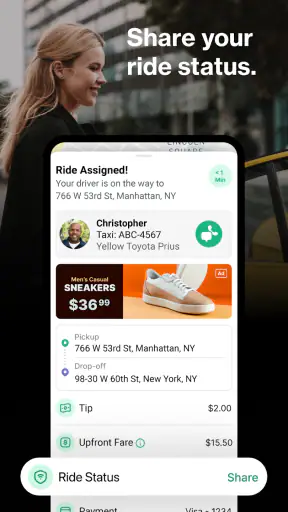
When a ride does not seem to progress, I avoid immediately sending repeated requests. First I check whether the pickup marker is still where I expect, whether the app is showing the correct destination, and whether I have moved since making the request. Duplicate requests can create more confusion than they solve, especially when the original taxi is already approaching.
If the app appears frozen, I use a calm recovery sequence: check the phone's connection, close and reopen Curb, and look again at the ride status. I do not repeatedly tap every control while the screen is unresponsive. A short pause can distinguish a temporary display problem from a request that genuinely failed. If the app reopens but the status remains unclear, I take note of the location and time before trying another action.
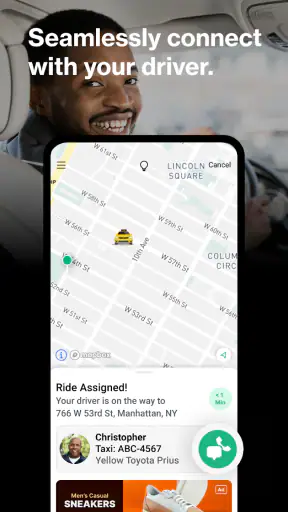
When the driver is nearby but cannot see me, I move toward a clearer meeting point rather than staying hidden behind a doorway. A large, visible landmark is usually more useful than a long explanation typed while both people are moving. If the pickup area has a designated taxi line or loading zone, going there may solve what looks like an app problem.
For advance rides, I check the booking details well before departure. If something looks wrong, discovering it while there is still time to make another plan is far better than noticing it at the moment a flight, appointment, or event begins. I treat the app as a coordination tool, not as permission to remove all backup planning from an important day.
Payment deserves its own recovery habit. After a completed trip, I look for confirmation before assuming the transaction is finished, but I avoid submitting payment actions repeatedly. If the screen is slow, I first verify whether the ride has already closed in the app. This prevents accidental duplicate attempts and gives me a clearer record if I later need to investigate a charge or receipt.
When the app is not the cause
Some frustrations are caused by the environment rather than Curb. A taxi may be delayed by a road closure, a concert crowd, heavy traffic, or a restricted pickup lane. GPS can also be less precise beside tall buildings or inside large complexes. In those situations, restarting the app will not create a clear route for the vehicle.
Availability is another important boundary. Curb is designed around taxi service, so it is not the best choice if I need a guaranteed nationwide ride network, a broad comparison of transport modes, or a detailed public-transit journey planner. A general map app may be better for comparing buses, trains, walking routes, and taxis in one view. A different ride service may be more practical in a place where traditional taxi coverage is limited. Curb makes the most sense when the local taxi network is the transport option I actually want.
The app also cannot control the quality of the pickup address supplied by a hotel, venue, or business. Some locations use a side entrance for vehicles even though visitors naturally wait at the front. If the same pickup confusion happens repeatedly at one place, I would ask staff where taxis are expected to stop instead of assuming the next request will behave differently.
Likewise, mobile connectivity can affect any ride app. If I am underground, inside a concrete terminal, or in a crowded area with unreliable service, the app may take longer to update. I prepare by opening the request before entering a dead zone, keeping the phone charged, and moving to a place where I can receive updates. These are not glamorous tips, but they are more dependable than treating every delay as a software failure.
Everyday situations where Curb makes sense
One realistic example is an evening appointment in a busy downtown area. I can arrange the taxi before leaving, choose a pickup point on a street where stopping is practical, and keep payment connected to the phone. When the appointment ends, I can request the return trip without searching for a taxi rank. The benefit is not that the app transforms transportation; it is that it reduces the number of small decisions I need to make while tired or distracted.
It can also suit visitors who prefer taxis to unfamiliar public transit. I still need to check the pickup location carefully, but I may feel more comfortable arranging a conventional taxi through a dedicated service than trying to interpret a complicated station layout. For someone carrying shopping bags or traveling with another person, paying through the phone can make the final part of the ride less awkward.
Families and small groups may appreciate the ability to organize a ride before everyone is ready to leave, but I would be careful about estimating the meeting time. The person who books should remain available to monitor the request and guide the group to the pickup point. If everyone scatters across a large venue, the convenience of advance planning disappears quickly.
Business travelers can use Curb as a repeatable routine: select a known hotel entrance, request the ride, and keep the payment process in one place. The trade-off is that a routine only works when the pickup address is genuinely consistent. Hotels with separate valet, taxi, and rideshare areas require a quick check each time, even if the destination is familiar.
How it compares with common alternatives
Compared with hailing a taxi on the street, Curb offers more preparation and a clearer phone-based payment workflow. Street hailing can still be faster in a dense taxi area, especially when several cars are already waiting. In that case, opening an app may add unnecessary steps. Curb is more valuable when I want a planned request or when finding a taxi manually would be inconvenient.
Compared with a broad ride-hailing platform, the important distinction is focus. Curb is centered on taxis rather than presenting itself as an all-purpose marketplace for every possible vehicle type. That can be an advantage for people who specifically want taxi service, but it also means I would not choose it automatically when I need to compare different transport options, inspect several service categories, or find coverage in a place where taxis are uncommon.
Compared with a standard maps app, Curb is more directly concerned with arranging and paying for a taxi. A maps app is usually the better tool for exploring an unfamiliar neighborhood, checking walking directions to a pickup zone, or comparing public transportation. I often see them as complementary: use the map to understand the physical location, then use Curb when a taxi request is the right transport decision.
The rating of 3.0 suggests that the experience is not consistently smooth for everyone, and my own recommendation reflects that. I would not install it as the only transport plan for a critical journey without first testing the local workflow. A short, low-stakes ride can reveal whether the service, pickup points, and payment process fit my needs before I depend on it for an airport departure.
Who should use it, and who should skip it
I think Curb is worth trying if I regularly choose taxis, want to request one from a phone, or prefer handling payment digitally. It is especially reasonable for planned city trips where I know the taxi network is active and can identify a sensible pickup location. The free price also makes testing the basic experience relatively easy, although the ride itself is a separate transportation expense.
I would hesitate to recommend it to someone who expects one app to cover every city and every transport type. It is also not my first choice for a person who dislikes troubleshooting phone-based payments, has unreliable mobile service, or needs highly detailed multimodal route planning. In those cases, a local taxi number, a street taxi, or a general navigation app may be a better fit depending on the situation.
My most useful advice is to separate three questions: can Curb accept the request, can a taxi physically reach the pickup point, and can I remain available until the vehicle arrives? A “yes” to only the first question is not enough. Thinking through all three makes the service feel far more predictable and helps identify whether a problem belongs to the app, the location, or the circumstances of the trip.
My practical verdict
Curb is a focused taxi-request and payment app with a genuinely useful purpose. I like the idea of arranging a ride and keeping payment on the phone, and I can see the value for planned trips, unfamiliar downtown areas, and moments when finding a taxi manually is inconvenient. Its long availability and large install base show that it has become a familiar option for many taxi passengers.
Still, I would use it with practical expectations. The most important preparation is not learning a hidden trick; it is selecting a reachable pickup point, completing setup before an urgent trip, checking the request instead of repeating it, and allowing time for traffic and local pickup rules. Those habits address the friction that most affects the real experience.
My recommendation is conditional but positive: try Curb if you specifically want taxi service and the local coverage suits you, then judge it after a simple test ride. Keep a backup option for time-critical travel, and choose a broader maps or transport app when comparison and route planning matter more than taxi booking. Used in the situation it is built for, Curb can remove several annoying steps; used as a universal travel solution, it is likely to feel too limited.


